
"I shot against a white wall and thought I didn't need this — the wall was grey on camera. The rebuilt white is the first version that looked right next to our other listings."

5,600+ Video Backgrounds Removed
Trusted by 1,600+ Creators and Businesses
Remove White Background from Video
Remove white backgrounds from videos automatically with AI. Keep your subject and export a transparent video without a green screen or manual masking
or drop a file,
paste video or
MP4, MOV, WEBM
4KUHD Quality
60 MinMax Length
$0.01/sAs Little As
- No watermark
- No green screen required
- Transparent WebM output
- Upload MP4, MOV, or WEBM
Real White Background Video Examples
See how RemoveVideoBG removes a white background from real footage — product demos, clothing clips, jewelry close-ups, and talking heads. Every result below was processed with the tool, in a single pass. Clean edges, no leftover white fringe, no green screen
White Background for Product Videos
BeforeAfter
A skincare bottle shot on a cluttered desk — the backdrop turns clean white while the label and reflections stay sharp.
White Background for Clothing & Apparel
BeforeAfter
A hoodie walkthrough filmed in a bedroom — the room turns clean white while fabric texture, shoulder lines and loose hood edges keep their shape.
Remove White Background from Jewelry Close-ups
BeforeAfter
A pendant filmed on a white sweep — the white is stripped to transparent so the piece can be layered over any design.
White Background for Furniture Videos
BeforeAfter
A solid white studio backdrop replaces the leather sofa's setting, while edge details—the armrests, stitching on the seat cushions and wooden legs—remain fully intact.
Remove White Background from Course Videos
BeforeAfter
Filmed against a study room background — the study room is removed so the presenter can sit over any slide deck.
Remove White Background from Talking-Head Clips
BeforeAfter
A presenter filmed in a bright room — the backdrop is removed and the clip exports as fully transparent video, with hair, shoulders and natural movement intact.
Every clip above was processed with RemoveVideoBG — no green screen, no manual masking.
Remove White Background NowHow to Remove a White Background from Video in 4 Steps
Upload the clip, choose white or transparent output, and export a clean result in seconds
no masking · no manual editing · no leftover white fringe
1
Upload your clip
Add the MP4, MOV, or WEBM file — drag, drop, or paste a URL.
2
Choose white or transparent
Pick clean white for product listings and marketplace pages, or transparent if you're layering the subject over other footage.
3
AI strips the white backdrop
The AI finds your subject in every frame and removes the white cleanly — no leftover white fringe around hair, hands, or soft edges.
4
Export your finished video
Download a ready-to-use MP4 for white backgrounds, or export with a WebM format for compositing.
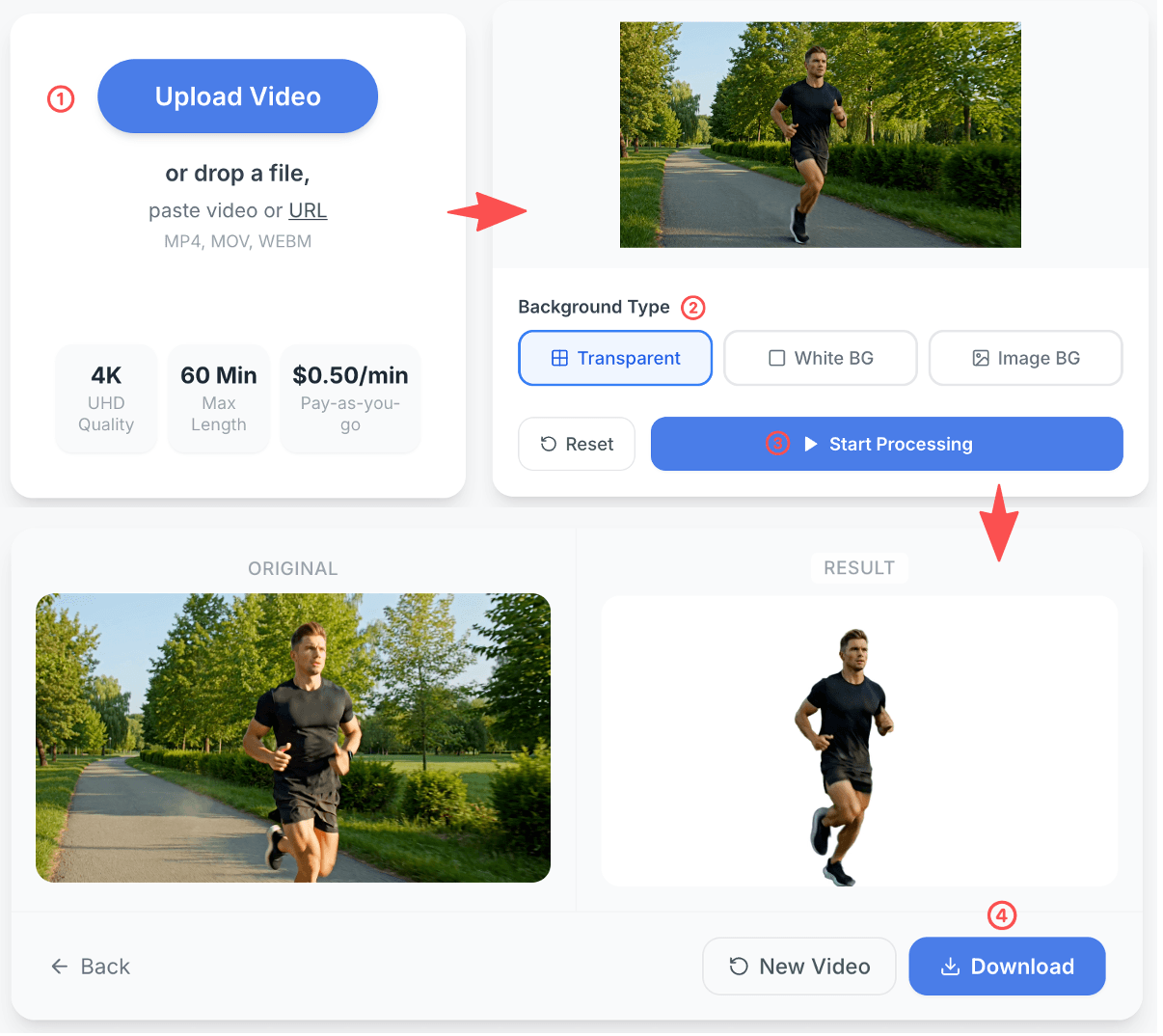
Why choose RemoveVideoBG to remove white backgrounds
Turn whatever you filmed against into clean, uniform white — or strip it away for transparent video.
Clean, Solid White — Not Grey
Home footage is rarely truly white — it's warm, patchy or shadowed. The backdrop is rebuilt as clean, solid white.
Steady in Every Frame
The white is rebuilt frame by frame, so it stays even while your subject moves — no flickering, no grey patches.
Fine Details Stay Intact
Hair strands, moving hands and reflective objects keep their shape — the white is removed around them, not through them.
Built for Product Pages and Listings
Output drops straight into marketplace listings, product demos and catalogue clips — no second pass in an editor.
Who needs to remove a white background from video?
Built for sellers, brands and editors who need a uniform white backdrop — or a transparent export to composite themselves.
E-commerce Sellers
Marketplace listings often call for a true white backdrop, not the grey your camera produced. Upload the clip and rebuild it cleanly.
Product & Brand Marketers
Keep product shots, seasonal ads and catalogue clips on one consistent white. Rebuild an even backdrop without a studio or a re-shoot.
Apparel & Accessories Brands
Shoot hoodies, bags or jewelry in a bedroom and still get a clean white backdrop. Fabric texture, metal shine and thin edges hold up.
Course Creators & Educators
Record against whatever wall you have, then drop the presenter over your slide deck. No whiteboard re-shoot, no per-lesson masking.
Video Editors & Agencies
Deliver transparent clips your team can layer straight into the timeline. Faster client turnarounds without a green-screen shoot.
Content Creators
Turn talking-head footage into transparent video for overlays, thumbnails and lower thirds. Film at home, finish without a green screen.
What users say about our white background removal
See how sellers, brands and creators use RemoveVideoBG to rebuild a clean white backdrop — no perfectly white original, no re-shoot
"Jewelry is where this usually falls apart. The chain and the thin settings came back clean, and the background stayed even through the whole pan."
"I export transparent and drop myself over the slide deck. No re-shoot, and I stopped masking every lesson by hand."
Frequently Asked Questions About Removing White Backgrounds from Video
Everything you need to know about removing a white background from video — no perfectly white original, no re-shoot, no studio setup required
How do I add a white background to a video?
Upload the clip, choose the white output, and the AI replaces the original backdrop with a clean, solid white — frame by frame. This works whether you filmed against a white wall, a bedroom wall or a busy room: the original backdrop is removed first, then the white is added.
Does my video need to be shot against pure white?
No. The backdrop just needs to be light and reasonably even — a white wall, a whiteboard, a white sweep, or even a bright room will do. The AI detects your subject first and rebuilds the background afterwards, so a slightly grey or uneven original is not a problem.
What counts as true white for product listings?
Most marketplaces and product pages expect a plain white backdrop with no colour cast — effectively RGB 255, 255, 255. A wall that reads white to your eye often sits closer to light grey or warm cream on camera, which is exactly the case this tool fixes.
Should I export white or transparent?
Choose white if the clip goes straight to a marketplace, product page or catalogue. Choose transparent if you plan to composite the subject yourself — over slides, branded scenes or other footage in an editor. You can run the same clip both ways.
Will the white stay even across the whole clip?
Yes. The background is rebuilt frame by frame rather than copied from a single frame, so the white does not flicker, drift or develop grey patches as your subject moves through the shot.
What happens to hair, hands and fast motion?
They keep their shape. The white is removed around fine strands, moving fingers and soft edges rather than slicing through them, so you should not see a grey rim or a halo left behind where the original backdrop was.
Can I get a clean white behind jewelry or reflective products?
Yes — reflective and semi-transparent items are handled per frame, so metal highlights and thin settings stay intact while the backdrop becomes solid white. Clips shot on a white sweep usually give the cleanest result.
Does removing the white background lower the video quality?
No. Processing affects the background layer only — resolution, frame rate and sharpness of your subject are preserved in the output, and 4K footage stays 4K.
Do I need to re-shoot my product video?
No. Upload the clip you already have — even one filmed at home or in a small studio — and the backdrop is rebuilt in post. There is no need for a studio re-shoot, a green screen or a second filming day.
Can I process a batch of product clips?
You can run clips one after another on the same account, and pricing is credit-based rather than per seat. For a catalogue-sized batch, process a few first to confirm the backdrop behaves the way you want before running the rest.
What if the white background comes out uneven?
Uneven results usually trace back to a backdrop that is both dark and low-contrast against the subject. Try a clip filmed against a lighter surface, or run the export as transparent and composite the white yourself — that path removes any dependency on the original backdrop.
Related Tools
Need to strip the backdrop completely? Try our video background remover.
Want a different backdrop instead? Use the change video background tool.