happy users

5,600+ Video Backgrounds Removed

Trusted by 1,600+ Creators and Businesses

Remove Green Screen from Video Online

Remove green screen backgrounds from videos automatically with AI. Keep your subject, choose a transparent or custom background, and download your finished video—no chroma key editing required

or drop a file,

paste video or

MP4, MOV, WEBM

4KUHD Quality
60 MinMax Length
$0.01/secAs Low as

See Green Screen Removal in Action

Watch how AI removes the green screen while keeping your subject in focus. Compare the original video with the transparent result, ready for your next project

Before: Green Screen
After: Transparent Background
Remove Green Screen from My Video

No editing skills required.

Transparent Video Export

Export your video as WebM (VP9) with a transparent background. Transparent MP4 and MOV exports are not currently supported.

Create with Transparent Video

Add your transparent video to presentations, social media content, or creative projects using compatible editing software.

How to Remove a Green Screen from Video

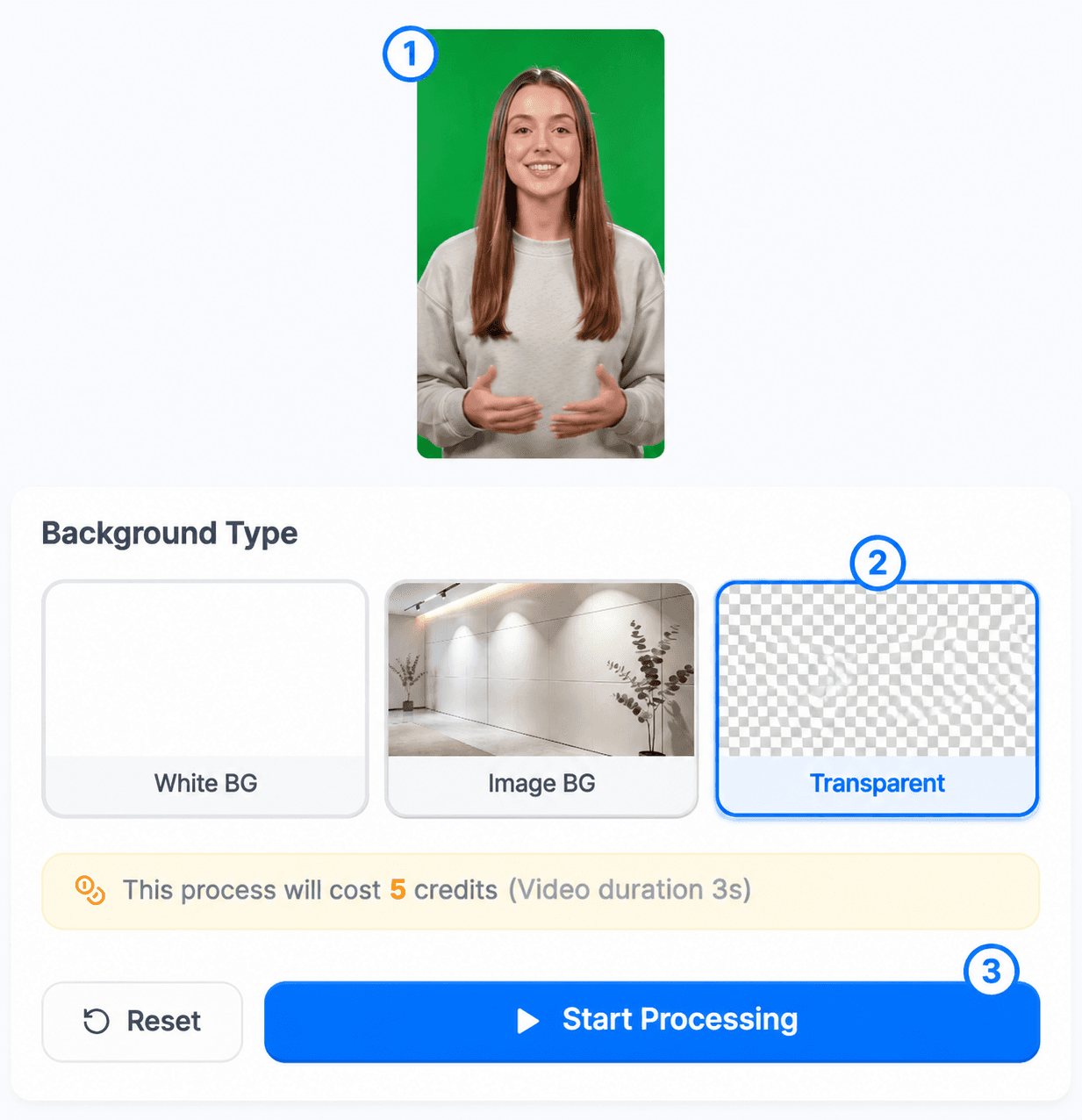
Remove a green screen from video in three simple steps. Choose a transparent background and download your video without chroma key settings or editing experience.

  1. Upload Your Video

    Upload a video with a green screen. AI detects your subject automatically.

  2. Choose a Transparent Background

    Select the Transparent option. AI removes the green screen while keeping your subject.

  3. Generate and Download

    Start processing, then download your finished video as transparent WebM (VP9).

Green screen remover interface showing a video upload, the Transparent background option, and the Start Processing button

Why Use Our AI Green Screen Remover?

Remove green screen backgrounds without complicated editing tools. Our AI makes it easy to isolate your subject and create new videos.

No Chroma Key Settings

Remove video backgrounds automatically without manual masking, color selection, or chroma key adjustments.

Works Without a Green Screen

Remove backgrounds from videos shot against green screens, indoors, or in everyday settings.

Flexible Background Options

Choose a transparent, white, or custom image background.

Green Screen Remover FAQ

Answers about removing video backgrounds, transparent exports, supported formats, credits, and output quality.

How do I remove a green screen from a video?

Upload your video, choose Transparent, white, or a custom image background, and start processing. The AI separates your subject from the green screen, then you can download the result.

Can I remove a video background without a green screen?

Yes. The AI can remove backgrounds from videos recorded indoors or in other everyday settings. Clear lighting and contrast between the subject and background can help the result.

Can I export a video with a transparent background?

Yes. Select the Transparent background option to export your video as WebM (VP9) with an alpha channel. You can use the result in compatible video editing and presentation tools. Keep in mind that not all video players and editors support transparent WebM files.

What format supports transparent video?

Transparent video exports are available in WebM (VP9) format. Transparent MP4 and MOV exports are not currently supported.

Can I replace a green screen with an image?

Yes. Select the custom image background option and upload the image you want behind your subject. You can also choose white or transparent output.

Is the AI green screen remover free?

You can upload your video and preview the original file for free. AI background removal requires credits, and the cost depends on your video length and selected background. You’ll see the required credits before processing. New accounts currently do not include free processing credits. Visit our Pricing page to explore available options.

Does removing a green screen affect video quality?

AI background removal is designed to preserve your subject while removing the background. Results may vary depending on video resolution, lighting, motion, and the complexity of the scene.

Need to remove a background from another video? Try our video background remover.

Want a different scene behind your subject? Use the change video background tool.

Working with a white backdrop? Try our remove white background from video tool.

Ready to Remove Your Green Screen?

Remove green screen backgrounds with AI—no manual masking or chroma key settings required.

Remove Green Screen Now