
"I filmed my videos at home and the background was always a mess. Now I just change my video background in seconds and everything looks way more professional."

5,600+ videos bg removed
Trusted by 1,626+ creators, marketers and sellers
Change Video Background with AI
Replace any background in seconds. No green screen, no complex editing - just professional results
or drop a file,
paste video or
MP4, MOV, WEBM
4KUHD Quality
60 MinMax Length
$0.01/sAs Little As
- No watermark
- No green screen required
- Works for TikTok, YouTube, and Instagram Reels
- Secure uploads and fast AI processing
Real Video Background Change Examples
See how our AI video background changer handles real footage — from talking head videos to product demos. Replace video backgrounds with white, custom images, or keep them transparent. No green screen, no manual masking
BeforeAfter
Change Talking Head Video Background
Replace the background in a talking head video instantly — great for creators and educators who record at home.
BeforeAfter
Replace Product Demo Background
Swap the background of a product demo to white or a branded scene — ideal for e-commerce and marketplace listings.
BeforeAfter
Swap Social Media Clip Background
Change your video background for TikTok, Instagram Reels, or YouTube Shorts without a green screen.
BeforeAfter
Modify Marketing Video Background
Switch to a branded background in your marketing videos to maintain visual consistency across all campaigns.
BeforeAfter
Change Online Course Video Background
Replace distracting home backgrounds with a clean, professional look for course recordings and tutorials.
BeforeAfter
Switch Personal Branding Video Background
Add a custom image or solid color background to personal branding videos for a consistent, polished look.
Change background to white / custom image / transparent — see more background examples
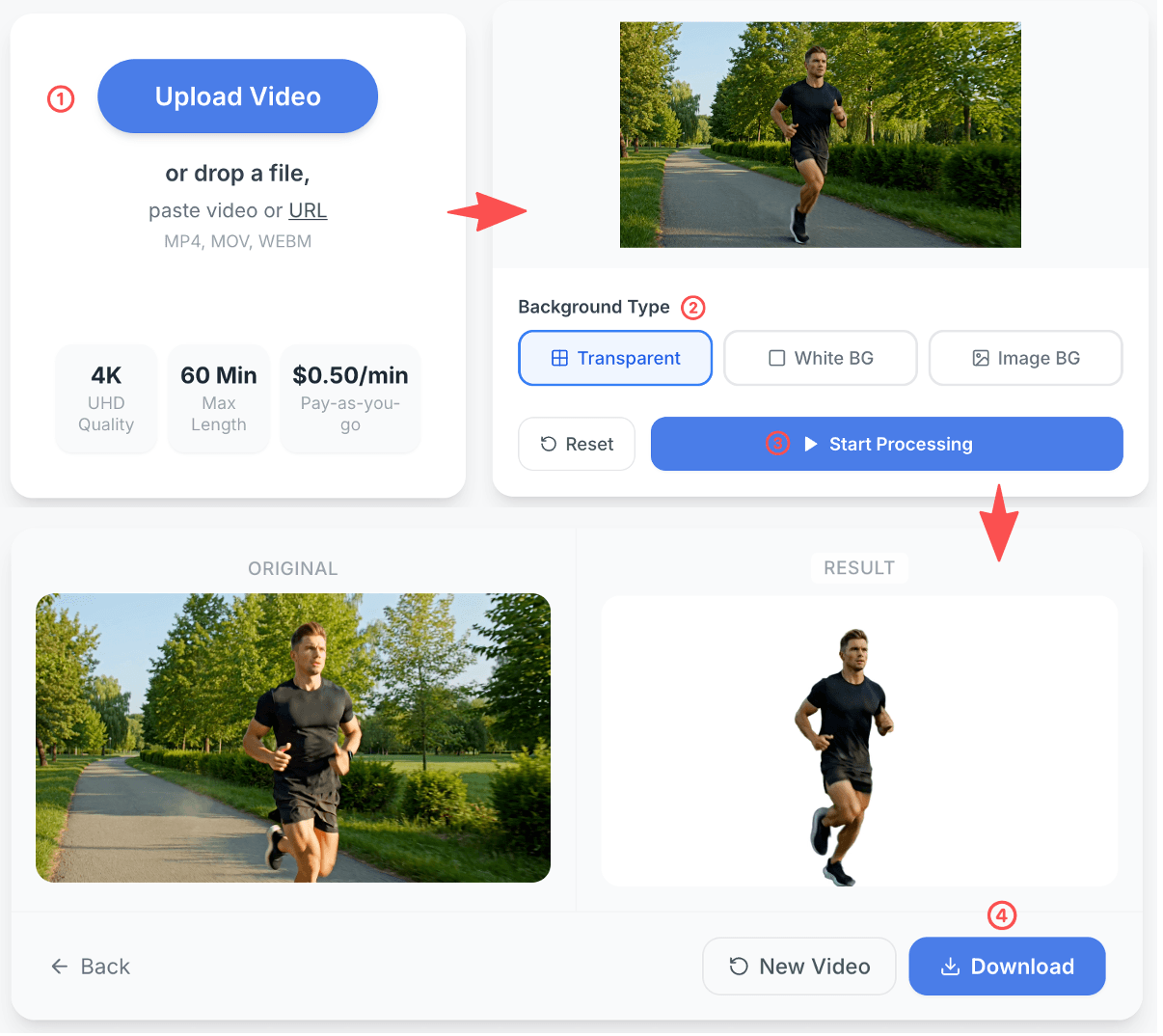
Change Video Background NowHow to Change Video Background in 4 Steps
Upload your video, select a new background, let AI automatically change the video background, and download your final result
no masking · no manual editing · no green screen required
1
Upload your video
Add any MP4, MOV, or WEBM file to get started. Drag, drop, or paste a URL.
2
Choose your new background
Select white, transparent, or upload a custom background image to replace the original
3
AI changes your video background
Our automatic video background changer isolates the subject and replaces the background in seconds
4
Download the result
Preview and download your video with the new background — completely watermark-free
Why choose RemoveVideoBG to change video backgrounds
Our AI video background changer delivers clean, accurate results on real-world footage
Studio-Quality Results
Get crisp edges around hair and fine details. Your videos look professional and ready to share instantly.
Zero Equipment Needed
Forget the green screen. Create high-end content anywhere without expensive studio setups or lighting.
Unlimited Backgrounds
Swap backgrounds with solid colors, professional scenes, or your own custom images in one click.
Instant AI Processing
Save hours of manual editing. Upload, process, and download your final video in seconds.
Who needs to change video backgrounds?
Our online video background changer is built for creators, educators, sellers, and teams who want to swap or modify video backgrounds quickly — without a studio or green screen
Content Creators
Change video backgrounds for talking-head videos, short-form content, and creator workflows. Works perfectly for TikTok, YouTube, and Instagram Reels without any green screen setup.
Marketers
Replace video backgrounds to match your brand. Modify marketing videos, ads, and promotional clips so every scene looks consistent and professional.
E-commerce Sellers
Change video background to white for product demos, marketplace listings, and showcase videos. Clean white backgrounds improve conversion and look platform-ready.
Educators & Coaches
Swap distracting home backgrounds with a clean office or branded scene. Change video backgrounds in online course recordings, tutorials, and coaching videos effortlessly.
Small Businesses
Add a custom background to business videos for websites, social media, and promotions. Professional results without a professional studio.
Agencies & Teams
Change video backgrounds at scale for client deliverables. Fast, automatic background replacement means faster production and lower editing costs.
What users say about our video background changer
See how creators, marketers, and sellers use our AI video background changer to replace backgrounds, save time, and produce cleaner videos — without a green screen
"We replace video backgrounds across all our campaigns to keep branding consistent. No green screen, no back-and-forth with editors — just fast, clean results."
"Changing the background to white on our product videos made a huge difference. Our listings look cleaner and conversions actually improved."
Frequently Asked Questions About Changing Video Backgrounds
Everything you need to know about how to change video backgrounds online — no green screen, no professional software, no design skills required
How do I change my video background online?
To change your video background online with RemoveVideoBG, simply upload your video file (MP4, MOV, or WEBM), select the background type you want — white, transparent, or a custom image — and click to start processing. Our AI automatically detects the subject in each frame and replaces the original background with your chosen one. Once processing is complete, preview the result and download your finished video. The entire process typically takes just a few minutes, with no manual masking or editing required.
Can I change video background without a green screen?
Yes — you can change your video background without a green screen. Our AI video background changer analyzes each frame of your video and separates the subject from the background using machine learning, regardless of what's behind them. Whether you filmed in a bedroom, office, or outdoors, the AI can replace the background cleanly. You do not need any special lighting, equipment, or studio setup to get good results.
Can I change video background after recording?
Absolutely. You do not need to re-record your video to change the background. Simply upload your existing video file and the AI will automatically replace the background in post-processing. This makes it easy to fix backgrounds in clips you already filmed — whether the original background was too distracting, too casual, or simply not on-brand. It is one of the most common use cases: changing video backgrounds after recording without any retakes.
How do I change my video background to white?
To change your video background to white, upload your video and select the 'White BG' option in the background type selector before processing. The AI will remove the original background and composite the subject onto a clean, solid white background. White video backgrounds are ideal for product demos, e-commerce listings, talking head videos, and any content where a distraction-free backdrop is important. The result is exported as a standard MP4 file, ready to use on any platform. If you want to remove an existing white backdrop instead, see how to remove white background from video.
Can I replace my video background with a custom image?
Yes. In addition to white and transparent backgrounds, you can change your video background to any custom image. Select the 'Custom Image' option, then upload your own background — a branded scene, office setting, natural environment, or any image you choose. The AI will composite your subject in front of the new background frame by frame. This is great for adding an office background to a home-recorded video, replacing a plain wall with a branded scene, or creating on-theme content for specific campaigns.
How do I change video background for TikTok or Instagram Reels?
To change your video background for TikTok or Instagram Reels, upload your clip in MP4 or MOV format, choose your new background (white, transparent, or a custom image), and download the processed video. The output is a clean MP4 file you can directly import into TikTok, Instagram, or any editing app for further trimming or captions. Many creators use this tool to change their video background without a green screen, giving their short-form content a more polished, professional look without a studio setup.
How do I change the background of a talking head video?
Talking head videos — where a person speaks directly to camera — are one of the best use cases for changing video backgrounds. Upload your talking head video, select a white, custom image, or transparent background, and let the AI process the clip. The AI is optimized to handle fine hair edges, shoulder details, and natural movement typical in talking head videos. Whether you are a YouTuber, course creator, coach, or marketer, this tool lets you change the background of your talking head video without re-recording or a green screen.
Is there a free online tool to change video background?
Paid plans are available on a credits basis. Check the pricing page for full details on free and paid options.
Can I blur my video background online?
While RemoveVideoBG specializes in fully replacing or removing video backgrounds rather than blurring them, you can achieve a blur-like effect by replacing the background with a softened or out-of-focus version of your original scene, or by downloading the transparent version and applying a blur in a video editor such as CapCut, DaVinci Resolve, or Premiere Pro. For most use cases — presentations, social media content, and creator videos — fully changing the video background to a clean white or branded image produces a more professional result than blurring.
How to change video background for YouTube?
To change your video background for YouTube, upload your recording in MP4 or MOV format, choose a background that matches your channel's branding or aesthetic, and download the processed clip. You can use a custom background image to match your channel art, switch to white for a clean tutorial look, or export with a transparent background for green-screen-style compositing in your editing software. Many YouTube creators use this tool to change video backgrounds after recording to maintain a consistent on-screen presence without building a dedicated studio setup.
How long does it take to change a video background?
Most videos are processed within a few seconds or minutes. A 30-second HD video typically takes under 2 minutes to change the background. Processing time depends on the video's length, resolution, and frame rate. Once your video is ready, you will be able to preview the result directly in your browser before downloading. The entire workflow — upload, background selection, processing, and download — is designed to take less than 5 minutes for most clips.
What is the best online tool to change video background?
The best online tool to change video background is one that combines accurate AI subject detection, flexible output options, and a fast, simple workflow. RemoveVideoBG is a purpose-built video background remover — it supports changing video backgrounds to white, custom images, or full transparency. It works without a green screen, handles fine details like hair and motion, supports popular formats (MP4, MOV, WEBM), and produces watermark-free output. Whether you need to change a background for TikTok, YouTube, e-commerce, or professional presentations, RemoveVideoBG is designed to deliver clean results without professional software.